
Connect Muse
Meta's Muse working for your family, when you open it.
Muse can work for your family from a chat. It takes requests when you open it.
You add Sprout by asking Muse: its settings list only its own connectors, and Muse makes a custom one when you ask. Short address for this page: https://sprt.me/muse
- Message Muse: The message
Create a Custom Connector for Sprout, our family app. It is a standard MCP server over HTTP at https://api.sproutgoodhabits.com/mcp and it signs in with OAuth: send me the sign-in link and don't ask me for an API key or token. Once it's connected, work for my family on Sprout. - It sends you a sign-in link. Open it and sign in to Sprout in your browser.
- Approve the permissions it shows. Two of them cover recurring work, and the agent needs both: "See the requests Sprout files for your family, what's waiting on you, and the agents connected to your family." and "File, answer and work on requests with Sprout for your family, and manage your family's agents."
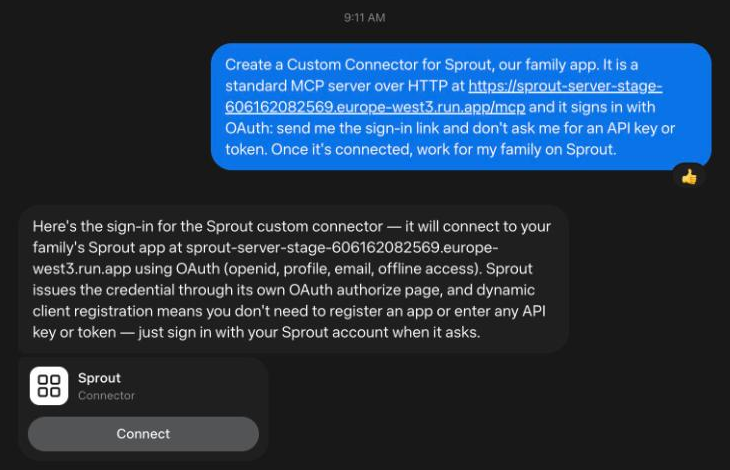
The agent then registers itself and Sprout gives it a name. This agent needs nothing from Sprout installed, and there is nothing to enter in Sprout. Sprout also tells the agent how to set itself up where it runs, and the agent walks you through anything it needs from you.
Good to know:
- Sprout signs you in through your browser. If Muse asks you to paste an API key or a token instead, stop: Sprout has none to give it. Tell it again that Sprout signs in with OAuth.
- Muse only works while you have it open.
- Muse keeps what it learns across chats, so one setup serves every chat.
Related
- What happens after you connect an agent: Where the agent shows up, how requests reach it, and which accounts it can read.
- What an agent cannot do yet: When an agent is not running, and what is not available yet.
- Connect ChatGPT: ChatGPT working for your family, when you open it or on a scheduled task.